

If you took the opportunity to read my ClickFunnels Review, then you’ve probably got all the information you need to pull the trigger and get started with your 14 Day Free Trial.
But before you jump on board, I want to breakdown the ClickFunnels Pricing structure, because it’s an ever changing thing. So it’s only fair that you get the most up-to-date pricing information to allow you to make the best decision.
ClickFunnels currently has three (3) primary pricing plans.
The first pricing tier is the ClickFunnels Standard $97/month plan. Next is the ClickFunnels Platinum $297/month plan. Finally the third and most expensive plan is the ClickFunnels Two Comma Club X for $2,497/month.
The biggest differences between the plans is the availability in varying features such as landing pages, domains, payment integrations, etc, but I’ll go further into that shortly.
ClickFunnels Overview
Product Name: ClickFunnelsVendor: Etison, LLCFree Trial: Yes – See HereBonus + Discount: Yes – Get Your Bonuses HerePrice: $97-297Niche: Business SoftwareTraining: YesRefund: Yes – 30 Days Do I Recommend: Yes

ClickFunnels Pricing 2022: Quick Overview
ClickFunnels offers a 14-day free trial with no credit card information required. You can do quite a bit during those two weeks if you put in the time and effort to use all of its features to build your funnels.
If you use your 14-day free trial to the fullest, I’m sure you’ll realize the value also. Then you can sign up and use it for a few months to see how your new custom sales funnels perform with your audience. At that point you can start to see how ClickFunnels pays for itself!
ClickFunnels offers three main pricing levels:
Standard ClickFunnels Plan – $97
This plan is perfect for those that are just starting out their funnel building. This plan has a limit of 20 funnels, 100 total pages, 40,000 visitors per month and 3 custom domains. This is typically fine for most people. You also get access to the funnel hackers forum. Pricing for the Standard plan is $97/month.
ClickFunnels Platinum – $297
You get everything mentioned above but unlimited. The main difference between the standard plan and the ClickFunnels Platinum suite is the number of Sales funnels, Follow-Up Funnels (email autoresponder), Backpack (affiliate program) and Landing pages allocated each month. Pricing for this Platinum plan is $297/month.
ClickFunnels Two Comma Club X – $2,497
You’re getting everything mentioned in the above plans. The main differences are that you are getting the VIP treatment and a ton of additional trainings. Also the main goal of this plan is to help you achieve the 2 Comma Club Award, which means you’ve successfully done 1 million dollars in transactions using ClickFunnels sales pages.
All ClickFunnels Pricing Plans
In total, ClickFunnels has 3 main pricing plans and 2 discounted plans depending on the features you are looking for:
- Standard Plan – $97 per month
- Platinum Plan – $297 per month
- 2 Comma Club X Plan – $2,497 per month
- Funnel Builder Secrets – $1,997 for 6 months
- Funnel Builder Secrets – $2,997 for 1 year
ClickFunnels Annual Plan
ClickFunnels recently came out with the Annual Plan option. When you opt-in to the annual plan, you will receive 2 months free. Of course you will have to pay for the entire year upfront, but you can clearly see the savings!
- Basic Plan – $80 per month
- Platinum Plan – $247 per month

ClickFunnels Pricing Table 2022 (Including Features)
|
Plans |
ClickFunnels |
ClickFunnels Platinum |
2 Comma Club X |
|---|---|---|---|
|
Pricing |
$97/month |
$297/month |
$2,497/month |
|
# Of Funnels |
20 |
Unlimited |
Unlimited |
|
# Of Pages |
100 |
Unlimited |
Unlimited |
|
# Of Visitors |
20,000 |
Unlimited |
Unlimited |
|
Custom Domains |
3 |
9 |
27 |
|
Billing Integrations |
3 type per |
9 type per |
27 type per |
|
# Of Users |
1 |
3 |
10 |
Looking for a ClickFunnels Discount? Let’s have a look at the 2 ClickFunnels discount plans called Funnel Builder Secrets.
Funnel Builder Secrets
6 Months of ClickFunnels
$
1,997
- Funnel Hacks Masterclass
- Funnel Builder Secrets Training
- Traffic Secrets Membership
- Unlimited Funnels Bonus
- 12 months Access To Funnel Scripts
- 30 Day Money Back Guarantee
Funnel Builder Secrets
12 Months of ClickFunnels
$
2,997
- Funnel Hacks Masterclass
- Funnel Builder Secrets Training
- Traffic Secrets Membership
- Unlimited Funnels Bonus
- 12 months Access To Funnel Scripts
- 30 Day Money Back Guarantee
How ClickFunnels Pricing Works?
The Standard ClickFunnels plan is $97/month, the ClickFunnels Platinum plan which is $297/month an ClickFunnels 2 Comma Club X for $2,497/month.
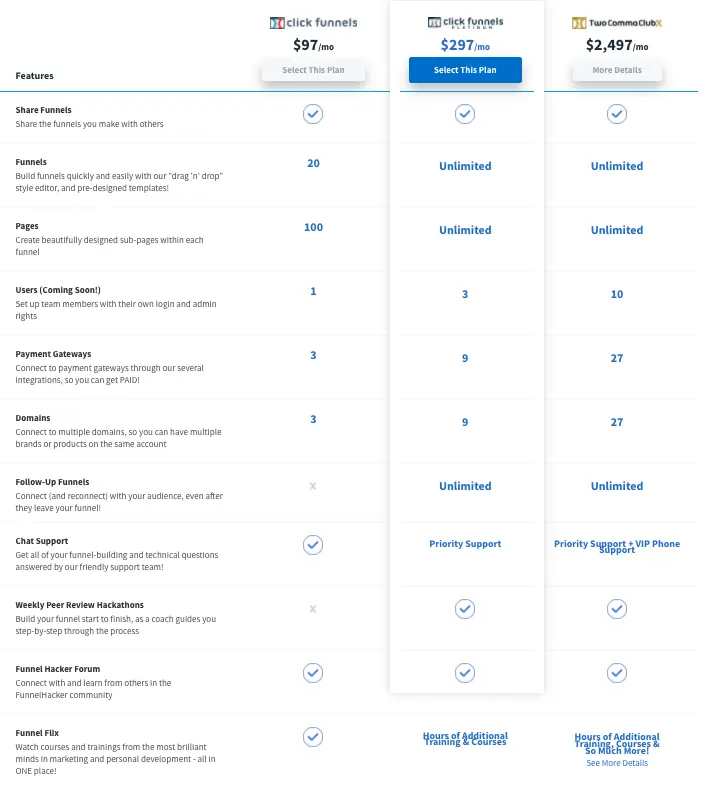
ClickFunnels Standard plan is limited to 20 funnels, 100 landing pages, 3 custom domains, and 1 user.
However, ClickFunnels Platinum already comes with unlimited funnels, unlimited landing pages, and 9 custom domains, and 3 users.
ClickFunnels 2 Comma Club X offers everything that is in the ClickFunnels Platinum plan but comes with more custom domains and payment integrations, plus VIP support with additional included training.
If you’re just starting out, then the Standard Plan is perfect for most situations. But if you find yourself engaging in more high volume sales, then you can upgrade to the Platinum or 2 Comma Club X plan if you’re looking to go to the next level.
Also consider the Funnel Builder Secrets Plans and get ClickFunnels at a discounted rate with additional memberships and trainings.
Pricing for other ClickFunnels Products
The ClickFunnels software is just one product out of many within the ClickFunnels product line. There are a variety of related products that you can purchase as well.
This is the main reason why so many people find the ClickFunnels affiliate program to be so lucrative. If you’re able to get other people to into any of these sales funnels, then you have the opportunity to earn affiliate commissions when people decide to purchase any of these products and their related upsells or downsells.
One Funnel Away Challenge Pricing
The One Funnel Away Challenge is a 30-day step by step training teaching you how to build a successful sales funnel. You are assigned three top coaches – Julie Stoian, Stephen Larsen and ClickFunnels co-founder Russell Brunson.
I’ve taken the challenge twice and have gotten so much value out of it!


The One Funnel Away Challenge costs exactly $100 + 19.95 for shipping, if you want the physical kit (Optional). That money pays for membership as well as the various materials that you’ll receive.
Also, if you’re able to share it with others as an affiliate, then you’ll earn 100% commissions just for promoting it.
Dotcom Secrets and Expert Secrets Pricing
Dotcom Secrets was the original book written by Russell Brunson. Inside you’ll learn why creating sales funnels is necessary for your business and how to become a profit machine selling products online.
Expert Secrets is the follow-up to the original book. It teaches you how to create your own tribe of raving fans who’ll be excited to buy your products or services. Also, the most valuable lesson to learn from this book is the art of telling stories to help present what you are selling.


To get paperback versions of the book, you purchase them through Amazon. At the time of crafting this article, Dotcom Secrets costs $14.71 and Expert Secrets costs $15.21
However, if you buy them through their respective Free + Shipping sales funnels, you can keep them at a discounted rate of $0. You just have to pay for shipping which is $7.95 for each book if you live in the United States.
Alternatively, if you want the hardback versions of the books, you can purchase them through the Traffic Secrets funnel. One of the upsells inside is for the secrets trilogy box bundle set. This includes hardback covers of Dotcom Secrets, Expert Secrets and Traffic Secrets, all for $30.
Funnel Scripts Pricing
What’s a good sales funnel without good sales copy?
Quiet is kept, it doesn’t matter how pretty your sales page is, without good copy, sales will be difficult to convert.

So if you struggle with writing good copy, then I would take a look at Funnel Scripts. It’s a web-based tool that assists you in writing better copy.
The price for Funnel Scripts is $797 for lifetime access. Or you can get it as part of Funnel Builder Secrets for Free.
Get ClickFunnels for Free
Take a test-drive of ClickFunnels today for FREE!
I’m sure once you do you’ll realize that this is the sales funnel builder you’ve been missing.
And if for some reason you decide later that ClickFunnels isn’t for you, then you can cancel your account without any worry of penalty fees.
Once you start your Free ClickFunnels Trial, not only are you getting the top rated sales funnel builder, but you’ll also get access to a variety of training and bonuses.
How to get your ClickFunnels Free Trial
To start your trial, simply click the button below, choose your plan and test it out for 2 weeks.
Affiliate Disclaimer: I hope you liked this ClickFunnels Pricing Post. Please note that some of the links inside this article may be affiliate links to ClickFunnels. That means that if you click on one of the links and sign up, I may be compensated for it. If you do happen to click, we really appreciate it! Any money I make keeps this site running smoothly and allows me to keep writing these high-quality reviews.




