

There are so many new social apps that you can hardly keep up. Of course, there are those that stand out from the crowd, a good example being TikTok. The App has taken the world by storm and managed to garner so many users, I decided to put together a simple TikTok marketing guide.Not so long ago, it had began as a video sharing App known as Douyin in China and TikTok to the rest of the world. In 2018, its creators decided to merge it with a more common App Musical.ly and migrated all their non-Chinese users to the new Tiktok App. They did, however, not get rid of the old Douyin App as it is still used in China.The new TikTok App was not taken too seriously, at least not by business people. It seemed like a simple app where mostly young people would share lip synching short music videos. But, with time the App has also caught the attention of business people.TikTok’s Growth…Just a few months after the merger, TikTok experienced tremendous growth. Reportedly it was the most downloaded free App on IOS in the first half of 2018 and also in Google play in October 2018. By match 2019 the APP had already been installed 1.1 billion times and now over 500 million people use it every month. A majority of these users are from India – they comprise of 43% of the total number of users.
As of April 2020 TikTok topped 2 Billion downloads!
How Does TikTok Work?
TikTok was created with young users in mind (13-24 yr olds) hence It is not surprising to find that most people in the older generation do not have an idea of what TikTok is. However, they are coming around as there is now a wider age-range of users enjoying the platform.The App encourages users to create and upload short videos up-to 15 seconds long or 60 seconds stories type videos. Before people would mostly share lip synching short music videos, but now users are coming with more creative and original content making the App even more interesting.

While using the App you will come across all sorts of people and content. Not all videos will be interesting enough as not everyone is talented and skilled to come up with creative and good content. You do not have to watch anything you don’t find amusing. The App provides the option to visit the Discover Page and play videos you find interesting and entertaining. You can follow people who create such content so as to view their creations more often. You can also search for particular content using relevant hashtags.If you want to create and share your own content, Tiktok shall assign you a profile which will enable you easily share videos and highlight all your uploads.
Who Uses TikTok?
Young people under the age of 30 love using the App, most being female. This can be attributed to the fact that Musically targeted the same audience – the Z generation and females. In the beginning 50% of Douyin users were under 24. With time it is speculated that the same group aged but still use the App. By February 2018, 31% of users were under 24, 23.5% users were between the ages 25-30, while 23.5% users were between the ages 30-35. Tiktok, may or may not follow the same trend – time will tell.
How Can You Utilize TikTok for Business?
Just like other social media apps that have numerous users such as Facebook, You Tube, Instagram and Twitter, TikTok can also be used to promote your business. How?Create your own channel and use it to market and promote your goods or services.Work with content creators who are already established in the platform to help you market your wares. Pay for advertising on the platform, however, this is a fairly new program and is yet to take root.Using the above tips can work wonders for your business. The most effective among the three is acquiring the help of influencers. That is, if you have not yet managed to build a brand and gain followers on the platform. It is an easy marketing strategy as influences already have a following and fans who would likely purchase products they endorse. You only need to ensure you pick an influencer who will do a great job in putting your products and services out there. Below are some of the ways influencers use to market products and services.
1. Hashtag Challenges
Hashtag challenges are quite common on the App. Usually, a user comes up with an activity and challenges other users to try emulating it. If the challenge is interesting enough, people jump in and within no time it starts trending. If this happens you can be sure that whatever is being promoted in the challenge will reach thousands, if not millions of users.
2. User Generated Content
This is whereby one encourages users to take a short video of themselves using particular products or services. Since entrepreneurs are always trying out new methods and getting involved in the new wave, this move is likely to be successful. You only need to be creative about it.
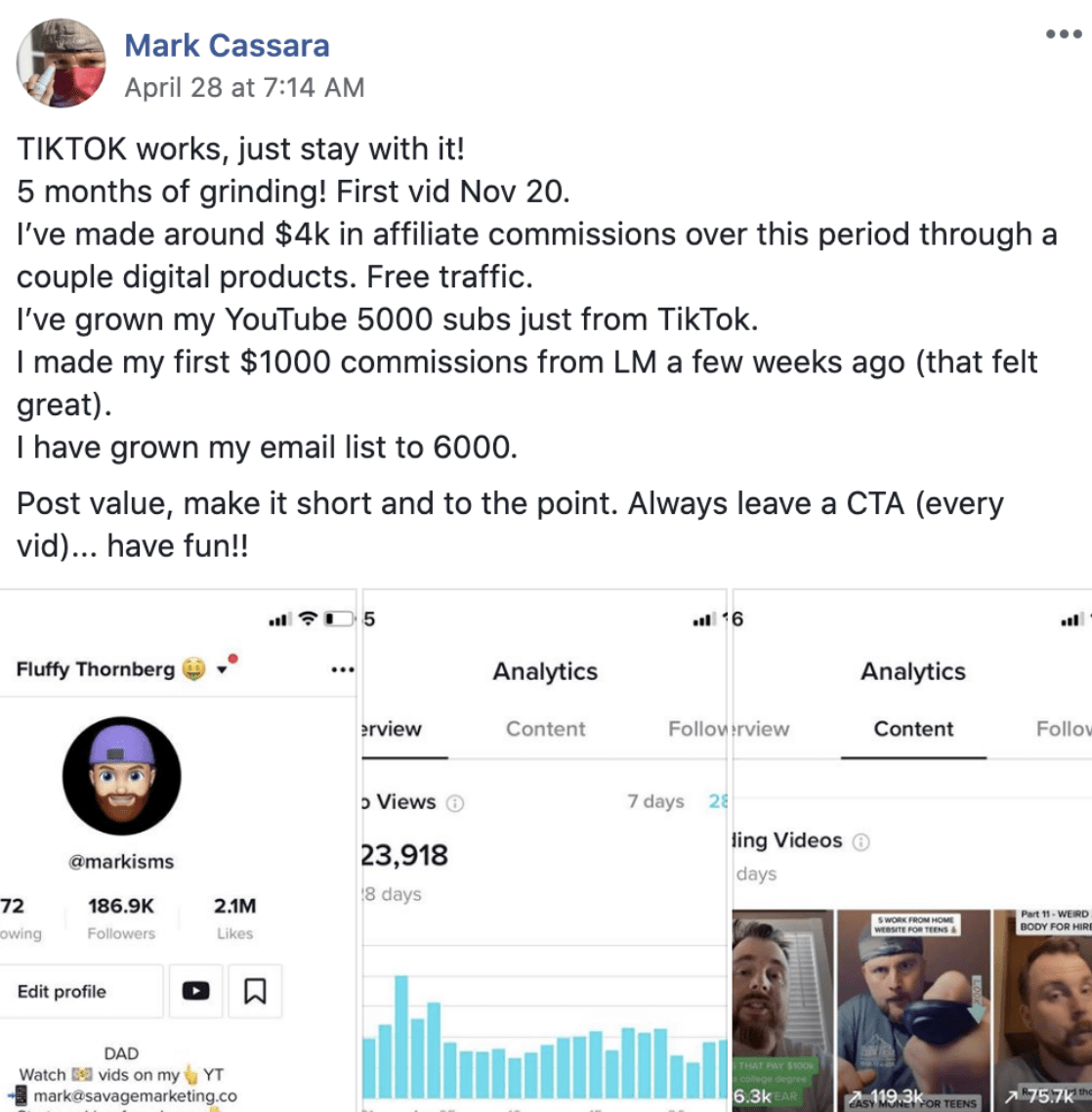
For example, affiliate marketers have come up with step by step tutorials teaching viewers how to earn online income through various methods. This allows potential customers of theirs to test those methods out and learn more from them specifically. Marketers would then encourage them to follow them on TikTok.
In the end, a lot of them were able to gain thousands of views in a short period of time. As a result, people flocked to their profiles to learn more, resulting in sales.
3. Traditional Influencer Marketing
In this form of marketing, businesses totally rely on influencers to create sound content and market their products and services. Since the influencer know what their audience like, they are better placed to come up with appealing content. YouTube is known for using this type of marketing and the results are usually impressive.
4. TikTok Advertising
Towards the end of 2018, Tiktok unveiled plans to begin an advertising system on the platform. This will focus on ad types including brand takeover, hashtag challenge, in-feed native video and snapchat-style 2D lens filters for photos.
In 2019, they started experimenting by posting short ads. However, the idea is yet to take off as TikTok is still carrying out ads in both the US and Europe. Hopefully they will experience a breakthrough as it will be a great marketing opportunity for businesses.
Did This Help You? If so, I would greatly appreciate it if you commented below and shared on Facebook

Mike Garvey JrFounder of BrandTheBoss.com
Affiliate Disclaimer: I hope you liked this TikTok Article. Please note that some of the links inside this article may be affiliate links. That means that if you click on one of the links and sign up, I may be compensated for it. If you do happen to click, I really appreciate it! Any money made keeps this site running smoothly and allows me to keep writing these high-quality articles.




